Turn images and videos into live ASCII art and retro effects
RGB ASCII & Retro FX Studio is a dedicated visual processing engine for creative developers, artists, and terminal power users. Run real-time GPU retro shaders in your browser with zero server roundtrips, stream 24-bit ANSI True Color video with synchronized audio in your terminal, or batch-render full-resolution clips via a bounded export microservice.
Interactive Web Studio Workspace
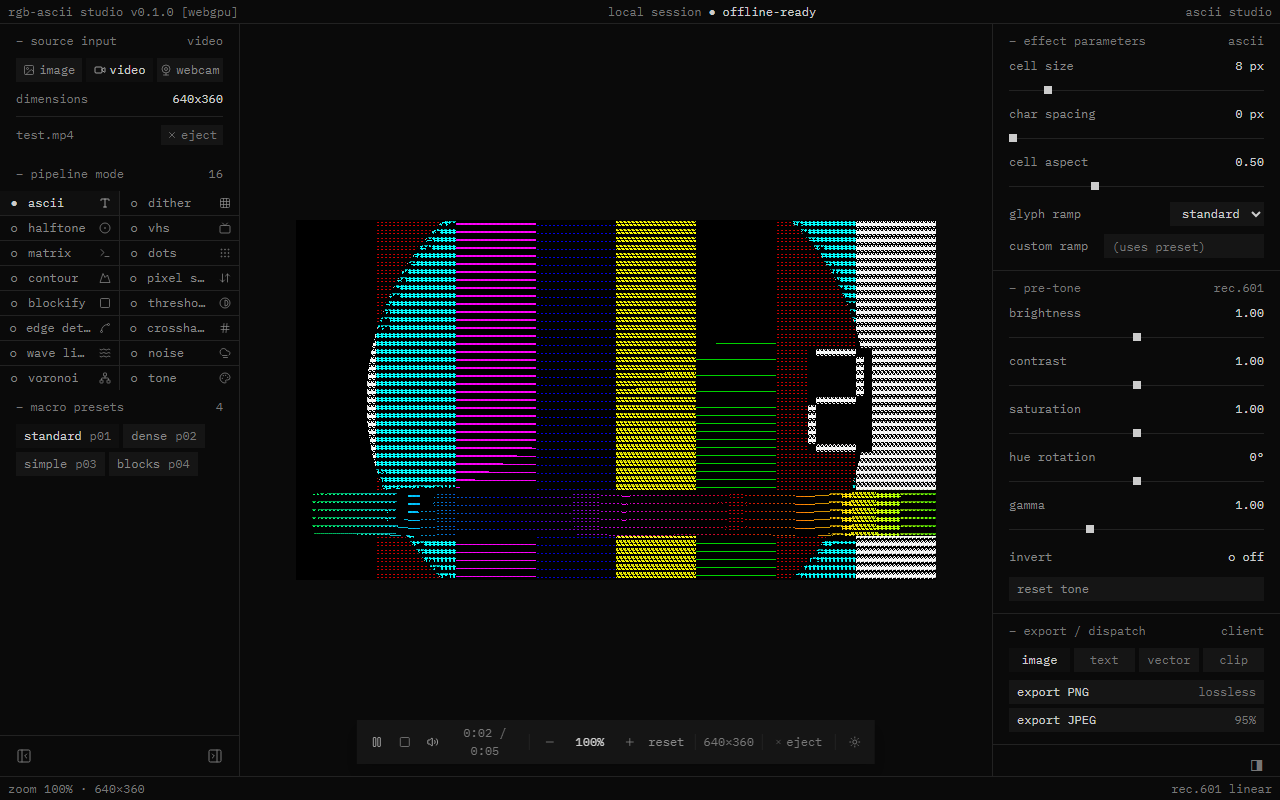
Three Specialized Production Surfaces
RGB ASCII is architected as three distinct components rather than a single monolith. Client-side preview, terminal rendering, and cloud transcoding are strictly segregated.
Browser Interactive Studio
Zero-install client web application running Three.js WebGPU and Three Shading Language (TSL). Automatically falls back to WebGL2 on unsupported browsers.
- Inputs: PNG, JPG, WebP, GIF, MP4, WebM, Live Webcam
- Shaders: 16 realtime shader modes with live parameter sliders
- Tone: Rec. 601 brightness, contrast, saturation, hue, gamma, invert
- Client Exports: PNG, JPEG, GIF (1-5s), SVG, .txt grid, WebM
- Privacy: 100% on-device GPU processing; zero file uploads
Python ANSI True Color CLI
High-performance terminal video player built using standard-library Python. Emits 24-bit True Color escapes (\x1b[38;2;R;G;Bm) with synchronized audio.
- Resolution: Half-block mode (
▀) for 2× vertical cell resolution - Audio Sync: Master clock sync with adaptive frame load shedding
- Smoothing: Temporal alpha smoothing reduces ASCII scintillation
- Pipeline: Subprocess FFmpeg pipe decoding + FFplay audio playback
- Zero Deps: Pure standard library Python 3.10+ runtime
High-Resolution Export API
Production FastAPI microservice for heavy transcoding tasks. Renders high-resolution MP4 video and animated GIFs with original source audio preservation.
- Transcoding: FFmpeg H.264/AAC MP4 & two-pass palettegen GIF
- Uploads: Chunked binary uploads (
/api/export/chunk) - Security: Cloudflare Turnstile bot verification
- Lifecycle: Isolated workspaces purged automatically by janitor
- Hosting: Free-tier single-worker deployment with bounded limits
16 Real-Time Retro Visual Shaders
Every shader runs as a native GPU pipeline in Three.js TSL. Switch between modes instantly with live parameter sliders and Rec. 601 pre-tone curve adjustments.
ASCII Glyph Atlas
Monospace luminance mapping with standard, dense, simple, and blocks ramps or freeform custom characters. Configurable cell size, spacing, and aspect ratio.
Ordered Dithering
Floyd-Steinberg and Bayer 4×4 / 8×8 matrix dispersion. Adjust quantization step levels and error distribution spread.
Halftone Dot Screen
Rotated CMYK / monochrome dot matrix printing raster with adjustable screen angle, dot frequency, and maximum radius.
VHS / CRT Monitor
Analog cathode-ray tube emulation featuring horizontal scanlines, RGB chromatic aberration, tape noise, and barrel curvature.
Matrix Digital Rain
Phosphor green digital rain streams cascading down columns. Tunable waterfall stream speed and glyph column density.
Circular Dot Grid
Subsampled circular LED/dot raster with luminance-scaled radii and dark inter-cell gutters.
Topological Contour
Iso-luminance elevation lines creating vector-like cartographic contour maps across high-contrast gradients.
Directional Pixel Sort
Simulated glitched pixel displacement along directional vectors based on brightness threshold and span length.
Mosaic Blockify
8-bit mosaic pixelation quantization with configurable block dimensions and luminance averaging.
High-Contrast Threshold
Binary 1-bit black/white cutoffs for stark graphic novel silhouettes and stencil separations.
Sobel Edge Detection
Spatial gradient convolution matrix revealing outlines, wireframe contours, and structural borders.
Pen Crosshatching
Layered diagonal stroke patterns emulating vintage print engravings and hand-drawn pen sketches.
Oscillating Wave Lines
Horizontal raster scans modulated by harmonic sinusoidal distortion and vertical displacement.
Film Grain & Static
Procedural pseudo-random analog film grain and static noise injection with variable intensity.
Voronoi Stained Glass
Geometric cellular tiling and stained glass crystallizations mapped over input colors.
Rec. 601 Tone Grading
Pure Rec. 601 pre-tone stage without geometric shaders: brightness, contrast, saturation, hue, gamma, and inversion.
Technical Specifications & Prerequisites
Clear facts regarding hardware capabilities, platform limitations, privacy boundaries, and supported formats.
Privacy & Data Boundary Policy
| Surface | Network Transmission | Processing Location | Storage / Retention |
|---|---|---|---|
| Browser Studio (/studio/) | 0 bytes transmitted | Local GPU / WebGPU / Canvas | Ephemeral memory only; cleared on tab close |
| Terminal Player (CLI) | 0 bytes transmitted | Local CPU + local FFmpeg process | Reads local disk file; zero telemetry |
| Server Export API | Encrypted TLS chunks | FastAPI worker running FFmpeg | Temporary disk file purged by janitor worker |
Browser & Hardware Prerequisites
- WebGPU: Supported on Chromium 113+, Safari 18+, and modern Firefox with WebGPU enabled. Uses dedicated hardware adapters where present.
-
WebGL2 Fallback: When WebGPU is unsupported or adapter creation fails, Three.js automatically switches to
forceWebGL: true. -
Webcam Feeds: Requires explicit user camera permission via the browser
navigator.mediaDevices.getUserMediaAPI over HTTPS. -
WebM Recording: Depends on client
MediaRecorderAPI support with VP8/VP9 or compatible codecs.
Supported Input & Export Formats
- Inputs: PNG, JPEG, WebP, GIF, MP4, WebM, live camera stream.
-
Client Image Export: PNG or JPEG snapshot directly from GPU canvas via
canvas.toBlob(). -
Client GIF Export: Animated GIF rendered client-side with
gifenc. Enforces a 1 to 5 second duration limit to safeguard browser memory. -
Vector & Text Export: Scalable vector SVG with colored
<tspan>elements and raw Rec. 601 plain text (.txt) grids. - Server Video Export: Full-length MP4 (H.264 video, AAC audio) with source audio track preservation and high-resolution GIF palettes.
Quick Start & Command Reference
Get up and running with the terminal video player, local browser studio, or server export backend in minutes.
1. Run the Python ANSI Terminal Video Player
Requirements: Python 3.10+ and system FFmpeg/FFplay binaries. Plays any video file directly in modern 24-bit ANSI True Color terminals with master-clock synchronized audio.
# Clone repository and install in editable mode
git clone https://github.com/Sujoy-004/ASCII.git
cd ASCII
pip install -e .

# Play video with 2x vertical resolution in ANSI True Color
rgb-ascii video.mp4 --half-block

# Alternative CLI options
rgb-ascii video.mp4 --preset dense --no-audio
rgb-ascii video.mp4 --no-color --smoothing 0.22. Run the Interactive Web Studio Locally
Requirements: Node.js 18+. Starts the Vite development server with Hot Module Reloading. Open http://localhost:5173/studio/.
cd web
npm install
npm run dev

# Open http://localhost:5173/studio/3. Run the FastAPI / FFmpeg Export Service
Starts the FastAPI microservice on port 8000 with CORS and health endpoints.
pip install -r requirements.txt
uvicorn src.api.main:app --host 0.0.0.0 --port 8000 --reload

# Check health endpoint: http://localhost:8000/healthFrequently Asked Questions
Does the interactive web studio upload my images or webcam feed?
No. The interactive studio runs 100% inside your local browser via WebGPU and WebGL2. When you drag and drop photos or videos, or activate your webcam, media buffers are uploaded exclusively to local GPU textures. Zero bytes leave your machine during interactive editing or client exports.
What happens if my browser or device does not support WebGPU?
The studio automatically falls back to Three.js’s WebGL2 backend (forceWebGL: true). While WebGPU offers higher performance and modern compute capabilities on supported browsers (Chromium 113+, Safari 18+), the WebGL2 fallback ensures shader compatibility on standard modern devices.
Why is the client-side GIF export limited to 5 seconds?
Client-side GIF rendering generates, quantizes, and palettizes uncompressed frames entirely within the browser tab’s memory using JavaScript (gifenc). Limiting recordings to 1–5 seconds guarantees smooth encoding without browser tab crashes or mobile memory out-of-bounds errors. For full-duration video and long GIF rendering, use the server-side export microservice.
How does the Python terminal video player keep audio and video synchronized?
The terminal CLI establishes a master audio clock timebase. An FFplay subprocess streams the audio track while an FFmpeg subprocess pipes decoded raw video frames to stdout. The Python runner continuously measures elapsed audio time and applies adaptive frame load shedding—dropping frames if the terminal emulator lags or holding frames if rendering leads—preventing desynchronization.
When should I use the server-side export service versus client export?
Use client exports (PNG, JPEG, SVG, .txt, 5s GIF, WebM) for instant, private downloads without server queues. Use the server export microservice when you need full-length high-resolution MP4 rendering with intact source audio tracks, or multi-pass palette-optimized animated GIFs.